

Contact Us

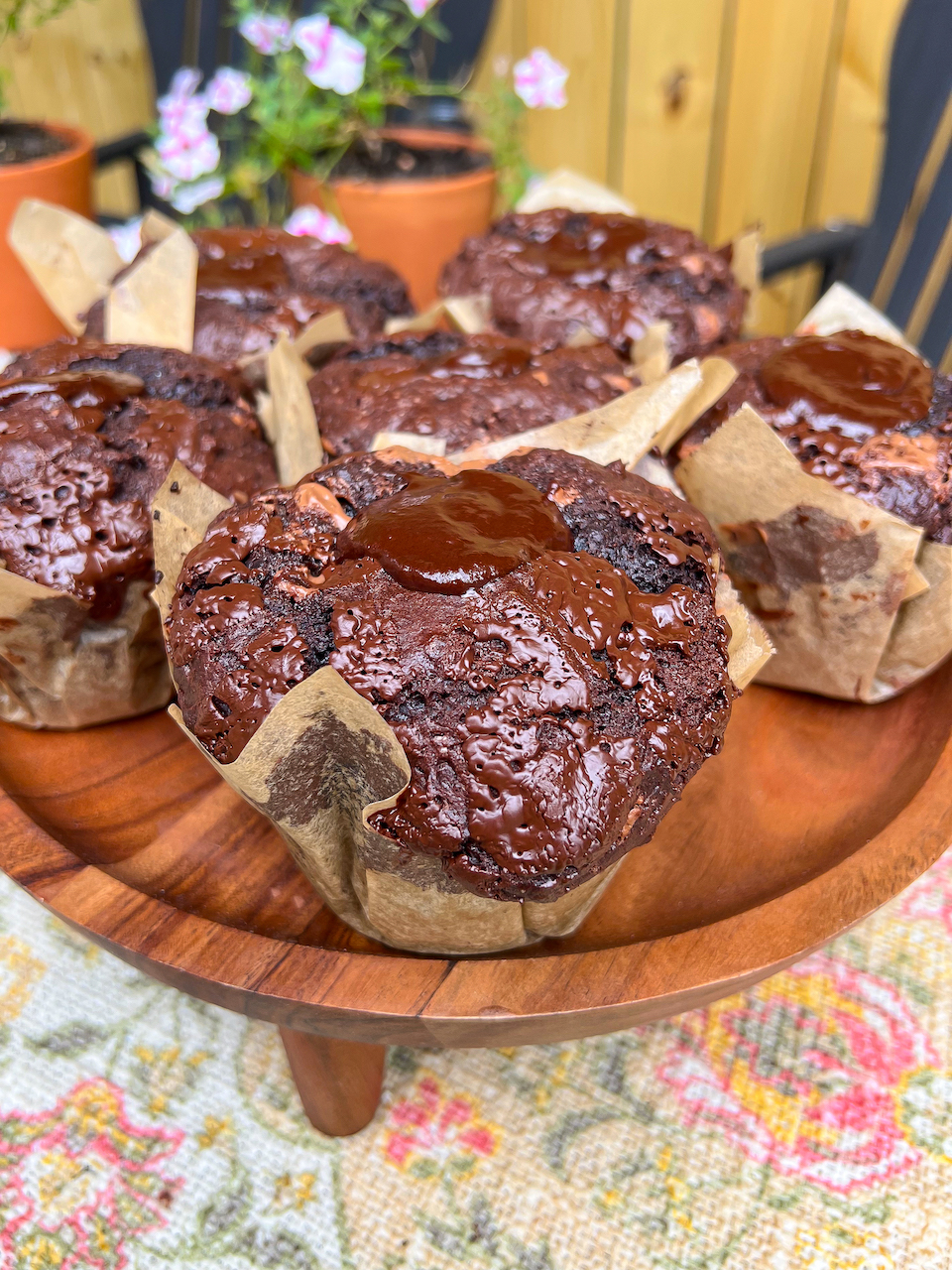
The VIRAL Olympic Village Chocolate Muffins Recipe

Send Us A Message

The new muffin man, Olympic Norwegian swimmer Henrik Christiansen, has us all craving those massive chocolate muffins from the Olympic Village, and here’s just how to make them at home!

Ingredients you’ll need:

  • 2 cups All Purpose Flour
  • 1 cup Granulated Cane Sugar
  • 3/4 cup Cocoa Powder
  • 1 tsp. Baking Soda
  • 1/2 tsp. Fine Sea Salt
  • 2 cups Chopped Milk Chocolate, or semisweet
  • 2 large Eggs + 1 Egg Yolk
  • 3/4 cup Plain Greek Yogurt
  • 1/3 cup Olive Oil
  • 3/4 cup Whole Milk
  • 2 tsp. Vanilla Extract
  • 1/2 cup Chocolate Ganache
    • 1/3 cup Heavy Cream
    • 2 oz. Semisweet Chocolate, finely chopped

How to Make Moist Chocolate Muffins:

  1. Preheat oven to 425F. Line a 6-count jumbo muffin tin, or a 12-count regular muffin tin
  2. Reserve 1/2 cup of the chopped chocolate.
  3. In a large mixing bowl, combine the flour, sugar, cocoa powder, baking soda, and salt. Mix well.
  4. Make a well in the center to add the eggs, egg yolk, yogurt, olive oil, milk, and vanilla. Whisk the center until the eggs are beaten.
  5. Switch to a spatula to fold the batter together just until combined (it’s okay if there are still flour clumps).
  6. Add the chopped chocolate and fold once more just until combined (and no more flour clumps).
  7. Use a large ice cream scooper to divide the batter evenly between the muffin liners. Top with the reserved chocolate.
  8. Bake for 5 minutes at 425F, then keep the oven door shut and reduce the heat to 350F to cook an additional 15-20 minutes, until tops are set. A toothpick inserted into the center should come out clean or only with fine, moist crumbs.
  9. Remove muffins from the oven to cool in the pan for 5 minutes, then transfer to a baking rack to cool another 10 minutes.
  10. In the meantime, make the ganache by heating up the heavy cream just to a boil. Pour over the chopped chocolate in a small bowl to sit for 5-10 minutes, and whisk until smooth. Transfer to a piping bag to pipe about 1 tablespoon worth into the centers of each muffin.
  11. Enjoy warm or let cool completely before storing.

NOTE: If making regular-sized muffins, bake at 350F the entire time for 15-20 minutes total.

How to Store Chocolate Muffins to Stay Fresher Longer:

Store muffins up to 3-4 days by lining an air-tight container or resealable bag with paper towels, then store the muffins in a single layer. You could also place another paper towel on top of the muffins to keep them from becoming soggy, as well.

The VIRAL Olympic Village Chocolate Muffins

The new muffin man, Olympic Norwegian swimmer Henrik Christiansen, has us all craving those massive chocolate muffins from the Olympic Village and here’s just how to make them at home!
Prep Time 10 minutes
Cook Time 25 minutes
Total Time 35 minutes
Course Dessert, Snack
Servings 6 Jumbo Muffins

Ingredients
  

  • 2 cup All Purpose Flour
  • 1 cup Granulated Cane Sugar
  • 3/4 cup Cocoa Powder
  • 1 tsp. Baking Soda
  • 1/2 tsp. Fine Sea Salt
  • 2 cups Chopped Milk Chocolate, or semisweet
  • 2 large Eggs + 1 Egg Yolk
  • 3/4 cup Plain Greek Yogurt
  • 1/3 cup Olive Oil
  • 3/4 cup Whole Milk
  • 2 tsp. Vanilla Extract
  • 1/2 cup Chocolate Ganache
  • 1/4 cup Heavy Cream
  • 2 oz. Semisweet Chocolate, finely chopped

Instructions
 

  • Preheat oven to 425F. Line a 6-count jumbo muffin tin, or 12-count regular muffin tin.
  • Reserve 1/2 cup of the chopped chocolate.
  • In a large mixing bowl, combine the flour, sugar, cocoa powder, baking soda, and salt. Mix well.
  • Make a well in the center to add the eggs, egg yolk, yogurt, olive oil, milk, and vanilla. Whisk the center until the eggs are beaten.
  • Switch to a spatula to fold the batter together just until combined (it’s okay if there’s still flour clumps).
  • Add the chopped chocolate and fold once more just until combined (and no more flour clumps). If you find that the dough is too thick, add 1/4 cup milk. Depending on the flour you use can change the density of the batter.
  • Use a large ice cream scooper to divide the batter evenly between the muffin liners. Top with the reserved chocolate.
  • Bake for 5 minutes at 425F, then keep the oven door shut and reduce heat to 350F to cook an additional 15-20 minutes, until tops are set. A toothpick inserted into the center should come out clean or only with fine moist crumbs.
  • Remove muffins from the oven to cool in the pan 5 minutes, then transfer to a baking rack to cool another 10 minutes.
  • In the meantime, make the ganache by heating up the heavy cream just to boiling point. Pour over the chopped chocolate in a small bowl to sit for 5-10 minutes, whisk until smooth. Let cool in the fridge 5-6 minutes to thicken up a little bit. Transfer to a piping bag to pipe about 1 tablespoon worth into the centers of each muffin.
  • Enjoy warm or let cool completely before storing.

Notes

NOTE: If making regular-sized muffins, bake at 350F the entire time for 15-20 minutes total.

Send Us A Message

Best Free PDF Reader Apps for Android, iOS, PC & Mobile Devices 2026

Compare the best free PDF reader software and apps for Windows PC, Mac, Android phones, iOS devices, and tablets. Download premium tools for instant digital magazine reading on any mobile device.

Choosing the best PDF reader app for your Android, iOS, or PC device enhances performance, security, and mobile reading experience. Compare free software downloads and premium subscription options.

Windows & Mac Software

Download free apps for PC and laptop

Android & iOS Apps

Best mobile apps for smartphones & tablets

Browser Tools

Chrome, Firefox, Safari PDF viewers

App Settings

Optimize software for mobile devices

Best PDF Reader Software for Windows PC & Mac - Free Download 2026

Adobe Acrobat Reader - Free Download for Windows & Mac

Download Adobe Acrobat Reader free software for Windows 10, Windows 11, and Mac computers. Industry-leading PDF app with premium subscription options for professionals and businesses.

Premium Features
  • Free download for PC and Mac
  • Professional annotation tools
  • Cloud storage integration
  • Mobile app sync (Android/iOS)
Subscription Costs
  • Premium features require paid plan
  • Resource-heavy on older PCs
  • Subscription pricing varies

Top PDF Software Comparison - Free vs Paid Apps 2025

Software/App Platform (PC/Mobile) Price/Subscription Rating
Adobe Acrobat Reader Windows, Mac, Android, iOS Free / Premium $14.99/mo 9.5/10
Foxit PDF Reader Windows PC, Mobile Apps Free / Pro $139 9.0/10
Sumatra PDF Windows 10/11 Free Download 8.5/10
Preview (Built-in App) MacOS, iOS Devices Free with Mac/iPhone 8.0/10

Foxit Reader - Best Free Alternative Software

Download Foxit PDF Reader free for Windows PC and Mac. Lightweight software alternative to Adobe with mobile app versions for Android and iOS devices. No subscription required for basic features.

Best PDF Reader Apps for Android & iOS - Free Mobile Downloads 2025

Adobe Acrobat Mobile App - Android & iOS Download

Download free Adobe Acrobat mobile app for Android phones, iOS devices, tablets, and iPads. Premium subscription unlocks professional features with cloud storage sync across all devices.

Mobile Editing Tools

Annotate PDFs on Android & iOS

Cloud Storage Apps

Sync files across mobile devices

OCR Technology

Convert scans to text on phone

Mobile Sharing

Send files from Android/iOS apps

Xodo PDF - Best Free App for Android & iOS Devices

Download Xodo free PDF reader app for Android smartphones, iOS devices, and tablets. Top-rated mobile software with no subscription fees or in-app purchases required.

Free Mobile App Features
  • Completely free - no subscription
  • Available on Android & iOS
  • Fast mobile performance
  • Works offline on phone/tablet
Premium Upgrades
  • Advanced editing requires premium
  • Cloud storage limited in free app

Mobile App Tip: Download PDF reader apps that support offline reading on Android phones and iOS devices to access magazines without internet connection or data usage.

Best Web Browsers for PDF Reading - Chrome, Firefox, Safari 2025

Google Chrome Browser - Free Download with Built-in PDF Viewer

Download Google Chrome free browser for Windows PC, Mac, Android, and iOS devices. Built-in PDF viewer with instant rendering - no additional software or app downloads required.

Chrome PDF Viewer Features - Free Built-in Tool

  • Free download for PC and mobile
  • No plugin or app installation needed
  • Works on Windows, Mac, Android, iOS
  • Google Drive cloud integration
  • Fast PDF rendering on mobile devices

Mozilla Firefox - Free Browser Download for All Devices

Download Firefox free browser with PDF.js viewer for Windows, Mac, Linux PC, Android phones, and iOS devices. Privacy-focused alternative to Chrome with customizable mobile apps.

Browser (Free Download) Platform/Devices Mobile Performance Best For
Google Chrome Windows, Mac, Android, iOS Excellent on Mobile General users & businesses
Mozilla Firefox All Platforms & Devices Very Good Privacy-focused mobile users
Microsoft Edge Windows PC, Android, iOS Excellent Windows 10/11 users
Safari Browser Mac, iPhone, iPad (iOS) Good on Apple Devices Mac & iOS device owners

Browser Extension Tip: Download free browser extensions and add-ons to enhance PDF viewing on Chrome, Firefox, and Edge browsers for PC and mobile devices.

Leave a Reply

Your email address will not be published. Required fields are marked *

Recipe Rating